What Semantic HTML Really Means —
And Why It Remains Unfinished After 30 Years
We write HTML every day. Most of it carries no meaning beyond "a box for CSS to style." The ideal of semantic markup has been pursued since 1991 — and it still isn't done. Understanding why tells us something fundamental about the web itself.
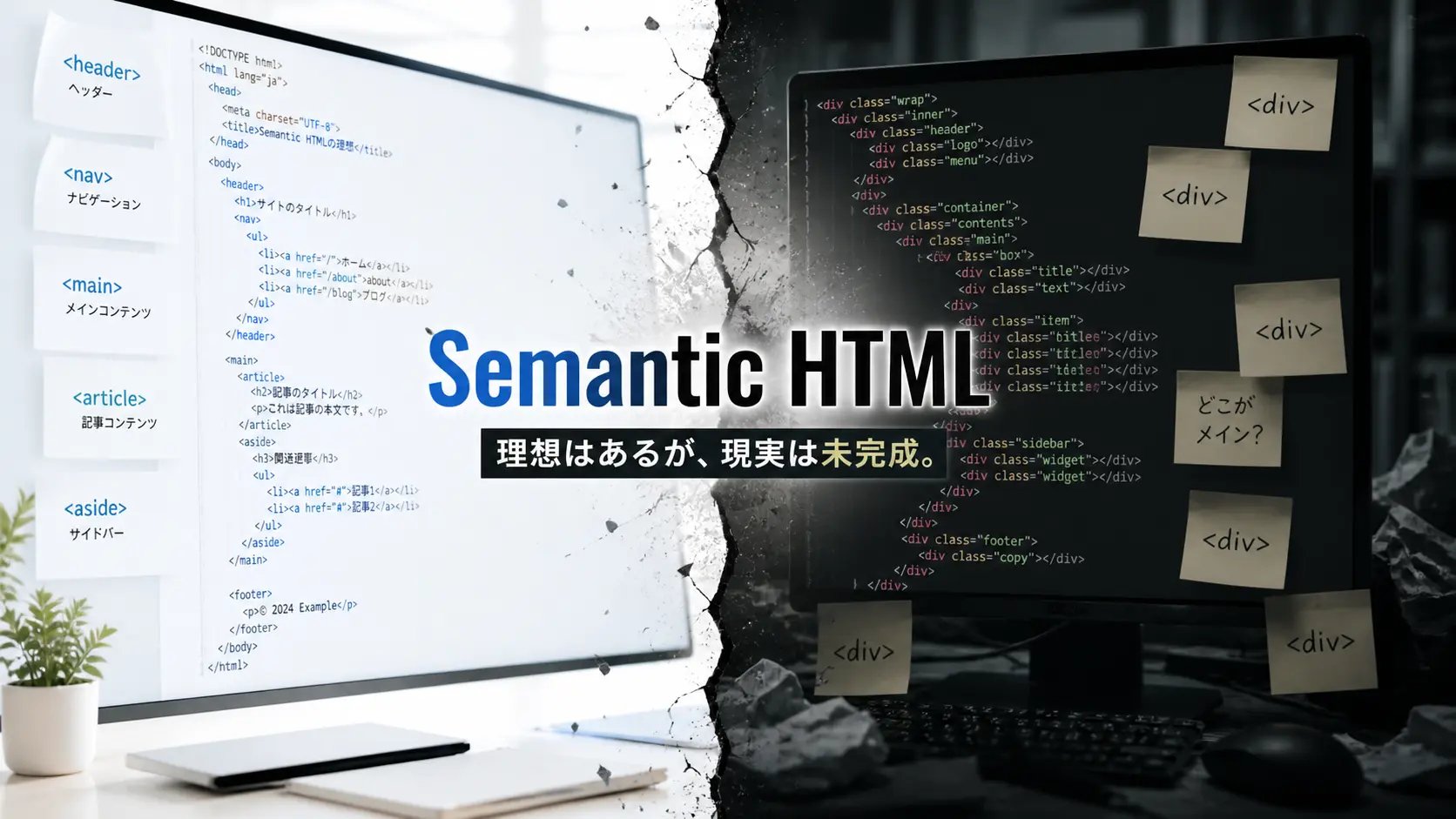
Does Your HTML Mean Anything?
Open the source code of whatever you shipped last week. Count the <div> elements. Ten? Fifty? Maybe over a hundred. Now ask yourself: how many of those actually represent a "division" of content in any meaningful sense? Most of them are just boxes — hooks for CSS classes, targets for JavaScript queries, wrappers for layout algorithms. They say nothing about what they contain.
That's not a moral failing. It's how the industry works. But it's worth pausing to remember that HTML was never designed to work this way. The language was born as a purely semantic system — every single tag existed to describe meaning, not appearance. What happened between then and now is a story about idealism colliding with pragmatism, and about feedback loops that reward the wrong behaviors.
HTML describes structure, not style. It encodes meaning, not layout. That was the original promise — and we've been breaking it for decades.
When most developers hear "semantic HTML," they think of a checklist: use <nav> for navigation, <article> for articles, <header> for the page header. That's not wrong, but it barely scratches the surface. The real question is deeper: why has the web been trying to make markup meaningful for over thirty years, and why hasn't it succeeded?
The Beginning — When Every Tag Was Pure Meaning
In 1991, Tim Berners-Lee published the first HTML specification from his office at CERN. It contained exactly 18 tags: <title>, <h1> through <h6>, <p>, <a>, <address>, <ul>, <ol>, and a handful of others. Every one of them described what the content was — a heading, a paragraph, a list, a link. There was no way to control color, font size, or layout. The idea of using HTML for visual design simply didn't exist yet.
Berners-Lee's ambitions went further still. On a mailing list in September 1991, he wrote that he would "prefer, instead of <H1>, <H2> etc for headings, to have a nestable <SECTION>..</SECTION> element, and a generic <H>..</H> which at any level within the sections would produce the required level of heading." He wanted documents that described their own hierarchical structure. A machine reading the HTML would understand not just "this is a heading" but "this is a third-level heading inside this section of that section."
The original HTML had zero presentational tags. Every element existed to describe meaning. It was 100% semantic by design.
That dream didn't last long. The browser wars brought <font>, <center>, <blink>, and table-based layouts. The web exploded in popularity precisely because people could make things look how they wanted — even if that meant abusing tags designed for tabular data to build entire page structures. Semantics took a back seat to visual expression.
Tim Berners-Lee publishes the first HTML spec at CERN. Every tag describes document structure. No visual control exists.
Netscape introduces <font>, <center>, and <blink> as proprietary extensions. HTML becomes a visual design tool.
W3C publishes CSS Level 1, proposing that presentation should be handled separately. Browser support is abysmal for years.
Berners-Lee publishes "The Semantic Web" in Scientific American, imagining a web where software agents understand meaning and reason over linked data.
The microformats movement begins, embedding structured data (hCard, hCalendar) into HTML via class attributes. A pragmatic alternative to RDF.
<article>, <section>, <nav>, <aside>, <header>, <footer>, and <main> become standard. The document outline algorithm is specified.
Google, Bing, and Yahoo create a shared vocabulary for structured data. The Semantic Web dream is repackaged for practical search use.
After never being implemented by any browser, HTML's document outline algorithm is formally removed from the WHATWG spec.
Why the Web Drowned in Divs
If semantics is the ideal, why is the actual web built out of meaningless containers? It's easy to blame lazy developers, but the real causes are structural.
CSS doesn't care about meaning
Flexbox, Grid, positioning — CSS layout operates on boxes, not on semantics. Whether you write <nav> or <div class="nav">, the visual result is identical. There is no CSS property that behaves differently based on semantic meaning. When the styling layer is completely indifferent to your tag choices, the incentive to choose the "right" tag evaporates.
Component architecture overrides document structure
In React, Vue, or Svelte, the unit of reuse is the component. A <Card /> component might appear inside an <article> on one page and inside an <aside> on another. Should it render as an <article>? A <section>? A <div>? The "correct" semantic element depends on context, but components are designed to be context-agnostic. The safe default is <div> — it can't be wrong because it doesn't claim to mean anything.
No feedback loop for correctness
Write invalid CSS, and things break visibly. Write broken JavaScript, and you get console errors. Replace every semantic element with <div>, and… nothing happens. The page renders. Links work. Google still indexes it. There is no immediate consequence for semantic incorrectness, which means there's no mechanism to train developers toward better choices.
A div never breaks anything. That's precisely why we reach for it. The greatest enemy of semantics isn't ignorance — it's the rationality of "it works, so why bother?"
Meaning lives in CSS class names. HTML elements serve as generic containers. Humans can read the intent from the classes; machines cannot infer document structure.
Using article, nav, aside, and other elements lets browsers, screen readers, and AI understand the page skeleton — even without CSS class hints.
Two Layers of "Semantic" — Elements and Structured Data
There's an important distinction that often gets blurred. When people say "semantic" in web development, they might be talking about two entirely different layers.
The first layer is HTML element semantics: choosing <nav> over <div>, using <article> for self-contained content, marking up time with <time>. This is about document structure — telling the browser and assistive technologies what role each piece of content plays.
The second layer is structured data: Schema.org, JSON-LD, microdata. This is about embedding machine-readable metadata that says "this page is about a Person named John who works at Company X" or "this is a Recipe with a cook time of 30 minutes." The consumers here aren't browsers — they're search engines, voice assistants, and AI systems.
Berners-Lee's grand vision — and its pragmatic descendant
In 2001, Tim Berners-Lee co-authored a landmark article in Scientific American titled "The Semantic Web." The vision was extraordinary: a web where software agents could follow links between meaning — not just between pages — and reason over structured knowledge to answer complex queries on your behalf. Find a doctor near your mother's house who accepts your insurance and has a rating above four stars. No clicking through pages, no comparing tabs. The machine would understand enough to do it for you.
That vision produced RDF, RDFS, OWL — powerful but heavyweight standards that never gained traction with ordinary web developers. The complexity was prohibitive. It took a decade for a practical compromise to emerge.
In June 2011, Google, Bing, and Yahoo (later joined by Yandex) launched Schema.org — a shared vocabulary for structured data that deliberately traded academic purity for developer usability. By 2015, over 31% of web pages contained Schema.org markup, spanning an estimated 12 million websites. The key insight was incentive design: mark up your content with structured data, and Google rewards you with rich snippets in search results. Recipes get photos and cook times. Products get prices and star ratings. Meaning, finally, had a business case.
The Semantic Web didn't fail — it was too ambitious. Schema.org succeeded by shrinking the dream to fit inside "what search engines will actually reward."
HTML5's Promise — and Betrayal
HTML5, which began development in 2008 and became a W3C Recommendation in 2014, was the biggest leap forward for semantic markup since the language was invented. It was also the site of its most spectacular broken promise.
The leap forward
HTML5 introduced <article>, <section>, <nav>, <aside>, <header>, <footer>, <main>, <figure>, <figcaption>, <time>, and <mark>. These weren't just "divs with names." Browsers expose them as ARIA landmarks, allowing screen readers to jump directly to the main content, the navigation, or a specific article. They provide genuine machine-interpretable structure.
<body>
  <header>
    <nav>...</nav>
  </header>
  <main>
    <article>
      <h1>Article Title</h1>
      <section>...</section>
      <aside>...</aside>
    </article>
  </main>
  <footer>...</footer>
</body>
The broken promise
The HTML5 specification included a "document outline algorithm" — the idea that nested <section> elements would automatically create heading levels. You could use <h1> everywhere, and the browser would compute the actual level based on nesting depth. This was Berners-Lee's 1991 dream finally codified into a spec, thirty years later.
In 2022, the algorithm was formally removed from the WHATWG specification. The reason, as Bruce Lawson bluntly stated: "it has never worked. No web browser has implemented that outlining algorithm." It existed in the spec for over a decade. Developers read the spec, trusted it, and used <h1> everywhere. Screen readers received a completely flat heading structure. According to WebAIM's survey, 85.7% of screen reader users find heading levels useful for navigation — and those users were being silently failed by a spec that described fiction.
What the spec says and what browsers implement are not the same thing. The outline algorithm taught us that semantic ideals, unimplemented, can actively harm the people they were meant to help.
The practical consequence remains with us today: in component-based architecture, you still need to manually manage heading levels (<h1> through <h6>) across context boundaries. A reusable component doesn't know what heading level it should use until it knows where it's being placed. This friction between component reuse and semantic correctness is one of the unresolved tensions of modern front-end development.
Why "Unfinished" Isn't "Failed" — and Why Now Matters
Semantic HTML has been an aspiration for over three decades without reaching completion. The outline algorithm never shipped. The Semantic Web didn't arrive as promised. Divs still dominate production codebases. Is this a failure?
I don't think so. HTML's tolerance — the fact that you can write broken, meaningless markup and things still render — is the same quality that made the web accessible to billions of people who never studied computer science. If HTML had enforced semantic correctness (refusing to display pages with improper nesting or misused elements), the web's explosive growth in the 1990s would never have happened. The "unfinished" state of semantics is the price of HTML's radical forgiveness.
But the consumers of meaning are multiplying
For most of the web's history, the only machines that consumed HTML semantics were screen readers and (to a limited extent) search crawlers. The incentive to write meaningful markup was narrow: accessibility compliance and maybe a slight SEO edge.
That equation is changing rapidly. The machines that now parse and interpret HTML structure include AI systems generating search summaries (Google's AI Overviews), voice assistants deciding which content to read aloud, browser reader modes stripping away chrome to present core content, content extraction APIs feeding LLMs, and RSS-like syndication tools that need to identify the "article" within a page. Every one of these systems benefits from semantic HTML. The more your markup communicates structure, the better these tools can serve your content to users.
Screen readers and basic search crawlers. Semantic HTML was framed as "accessibility compliance" — important, but lacking broad business incentive.
LLMs, AI search summaries, voice assistants, reader modes, content extraction tools. The number of systems that interpret HTML structure has exploded.
WAI-ARIA: the supplement, not the substitute
Where native HTML elements can't express the meaning of modern interactive UI — tabs, accordions, live-updating regions, custom widgets — WAI-ARIA fills the gap. Attributes like role="tablist", aria-expanded="true", and aria-live="polite" communicate state and purpose to assistive technologies that HTML alone cannot convey.
But ARIA comes with a crucial principle, often called its "first rule": if a native HTML element already communicates the semantics you need, don't use ARIA. A <button> doesn't need role="button". A <nav> doesn't need role="navigation". ARIA exists to extend HTML's semantic vocabulary, not replace it. Used carelessly — slapping role attributes on divs instead of using proper elements — it can make accessibility worse, not better.
The question for today
Semantic HTML may never be "finished" in the way a completed specification is finished. The web is too large, too diverse, too forgiving for that. But the reward for writing meaningful markup — the practical, measurable benefit — is greater today than at any point in the web's history. AI systems are hungry for structure. Accessibility lawsuits are increasing. Browser features like reader mode depend on landmarks. The machines that interpret your HTML are no longer a niche concern; they're the primary way many users will encounter your content.
Semantic HTML being "unfinished" isn't a failure — it's a trade-off with the web's radical forgiveness. But in the age of AI, the reward for meaning has finally caught up with the ideal.
Next time you reach for a <div>, pause for one second. Ask: what is this? Is it navigation? An article? A complementary sidebar? You don't need to get it perfect every time. But the habit of asking — that alone shifts your markup from "boxes for CSS" toward something that speaks to the growing ecosystem of machines trying to understand what you've built.
Takeaways
- When HTML was created in 1991, all 18 tags were purely semantic — every element described meaning, not appearance. Presentational tags didn't exist.
- The browser wars introduced visual tags and table layouts, establishing a div-centric development culture that persists today largely because CSS doesn't differentiate between semantic and non-semantic elements.
- HTML5 added landmark elements (article, nav, aside, main) that provide real value to assistive technologies, but its headline feature — the document outline algorithm — was never implemented by any browser and was removed from the spec in 2022.
- "Semantic" operates on two distinct layers: element-level document structure (for browsers and screen readers) and structured data like Schema.org/JSON-LD (for search engines and AI). Both aim to make meaning machine-readable.
- The fundamental reason semantics remains "unfinished" is HTML's error-tolerant design — the same forgiveness that enabled the web's explosive growth also means incorrect markup carries no immediate penalty.
- The incentive to write semantic markup is stronger now than at any point in web history, as AI summaries, voice assistants, reader modes, and content extraction tools all depend on meaningful HTML structure to serve users effectively.